
General Microsoft
Microsoft ASPX: How to Find Your Next Growth Opportunity as a Partner
| 4 min read

- Ashley GerosPartner Profitability Executive
The latest enhancement to the Microsoft Partner Center brings essential decision-making support data just one click away and has the potential to transform how we view advanced security sales strategies.
The ASPX (AI Business Solutions & Security Partner eXperience) is described by Microsoft as “our hero customer targeting framework.” With the purpose that, “It aims to unlock partner success through a data-led, scalable, upsell framework using propensity and customer insights directly in Partner Center.”
The less technical description is that you start getting answers around which customers you need to be talking to, what you need to talk with them about, and why that conversation is important.
It brings data into a digestible, easy to use format that allows the user to target the right customers with the right solutions. It pulls into account a customer’s Security Maturity vs Productivity Maturity and allows the user to determine where these two factors intersect and presents the best option for both the Partner and the customer. This feature changes how we view the upselling process with additional data driven insights.
Rather than approaching every customer with the same conversation, ASPX helps identify where a customer sits on their journey. Some organizations may be aggressively investing in AI and productivity but have security gaps that could slow adoption. That’ll be a good, specific conversation to have. Others may have a strong security foundation but haven't yet realized the value of Copilot or other modern workplace investments. That illuminates a different kind of opportunity that would wouldn’t get otherwise without that guidance layer in ASPX.
It not only supports decision-making for where a customer is today but also allows you to plan for the customer and their security needs in the future.
Where to Find this Information
In your Microsoft Partner Center Insights section, you will find these insights in the AI Business Solutions & Security section located on the left-hand side of your Microsoft Partner Navigation Menu.
Here you find the options for Growth Opportunities. Selecting this unlocks the wealth of information in the areas of Copilot Opportunities, E3 Opportunities, E5 Expansion Opportunities and Tenants.
Data found here can be accessed directly within the Microsoft Partner Center, Downloaded using the tool feature, and support an API Integration for Power BI and CRM.
How it works:
- Select each available Reporting feature to navigate to the opportunity of interest.
- Utilize interactive graphics to narrow down the concentration of displayed data.
- Review available customer output for download customers best suited for monitoring, customer conversations or initiation of Go To Market strategies.

Things to Keep in Mind:
- The tool will indicate At Risk Customers. Tenants may be at risk for seat loss due to extremely low usage patterns. Not all workloads need to be at risk for a tenant to be at risk.
- The Data Directory is available to support navigation and terms for each section
- The Total Copilot MAU includes Licensed and Unlicensed users.
- The Copilot Opportunities tab shares data for customers tenants that meet specific criteria: Enterprise- 150 Microsoft 365 licenses OR Small Medium Enterprise & Channel (SME&C) with more than 25 Microsoft 365 licenses.
Getting the Most Value from ASPX
You need to engage with the data and insight that you find on a weekly to quarterly basis. You’ll be surprised at the new opportunities available to you along with some of the more at-risk opportunities.
Just remember to keep sales and marketing aligned on what qualifies as "customer readiness” so there can be proper tracking along your internal processes. If you have a more complex organization, you can filter by tenant size and industry to better engage specialized teams.
With FY27 Here, There has Never Been a Better Time to Incorporate ASPX into Your Planning Efforts
Understanding customer opportunities in their current status can not only enable a targeted effort, but ASPX can act as a supplemental resource if your organization is eager to achieve additional badges or specializations related to the Microsoft Frontier offerings.
Taking the time to review current features to see how it relates to your current customer base is going to start a chain reaction of follow-up activities for a targeted sales motion. All these activities should culminate in starting very specific customer conversations around growth opportunities.
If you need help getting started with that motion, Microsoft has a PDF playbook for you to follow: https://aka.ms/ASPXPlaybook
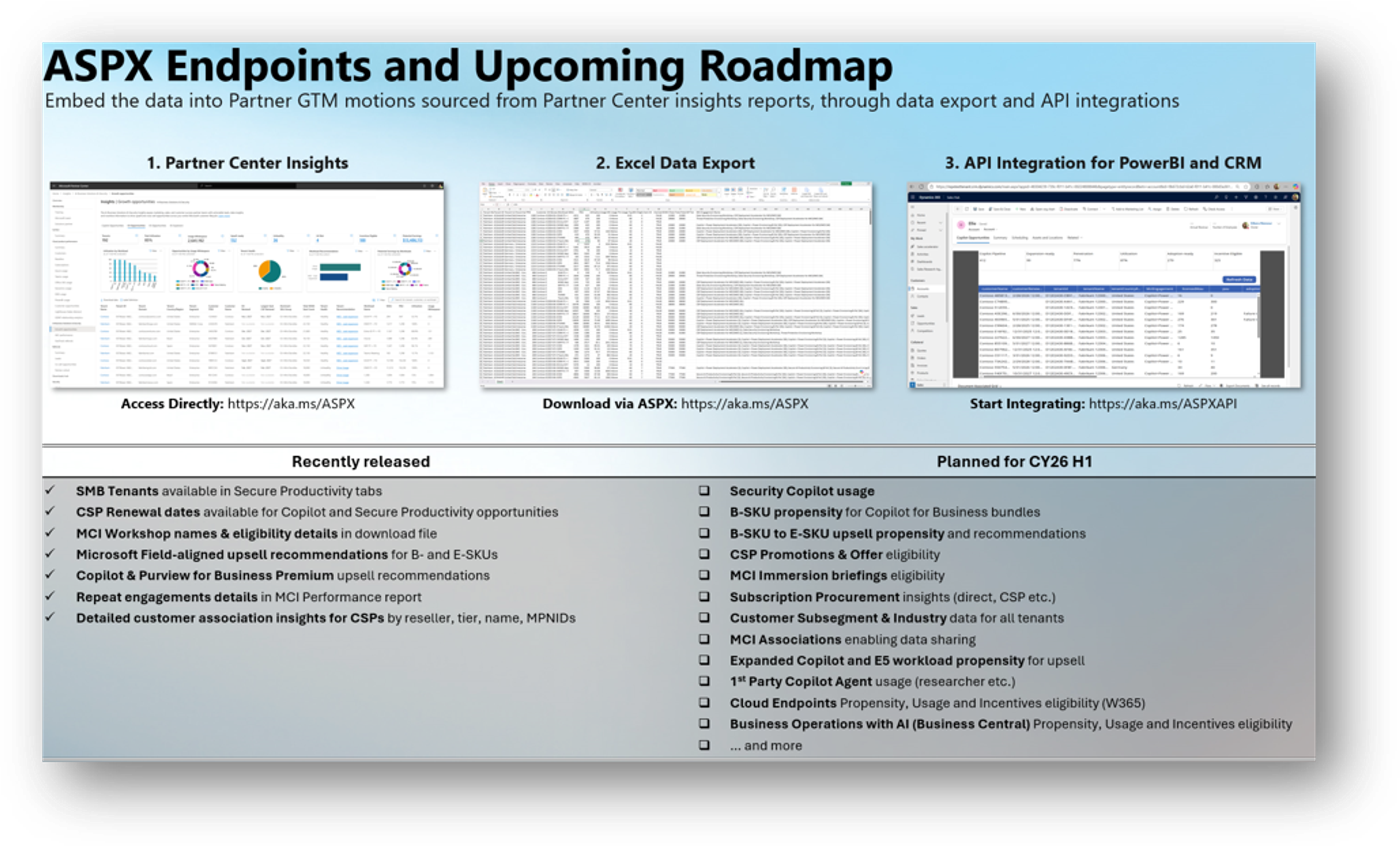
Learn More – Review the ASPX Learn Page and share with your team
Leverage ASPX data in your Partner GTM Motions – Ensure your sales & marketing teams can access the data and insights
Consider API Integration – Bringing the data to your sellers via an API integration to reduce manual efforts. Learn how you can do this here: